Create putty SSH Key for secure login you need to follow these steps:
Step 1: Download Putty gen software to create SSH key.
Step 2: Run Putty gen software and click on generate Tab.
Step 2: Run Putty gen software and click on generate Tab.

After Click on generate tab it look like this

Step 3: Type Password on Key Passphrase box
Step 4: Type Password again for confirmation in confirm passphrase box
Step 5: Click on save public key and save file with respective user name
Step 4: Type Password again for confirmation in confirm passphrase box
Step 5: Click on save public key and save file with respective user name
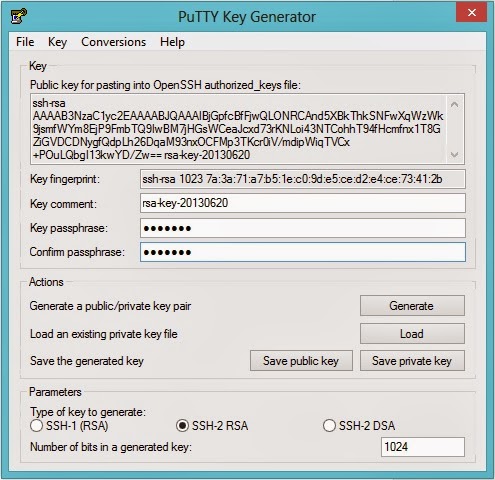
Step 6: Click on save private Tab and save file with .ppk extension
Below File has been created after 5th and 6th step
- private-key.ppk
- Public-key
Step 7: Now you can send Public key to biglobe san for update in all server.

